
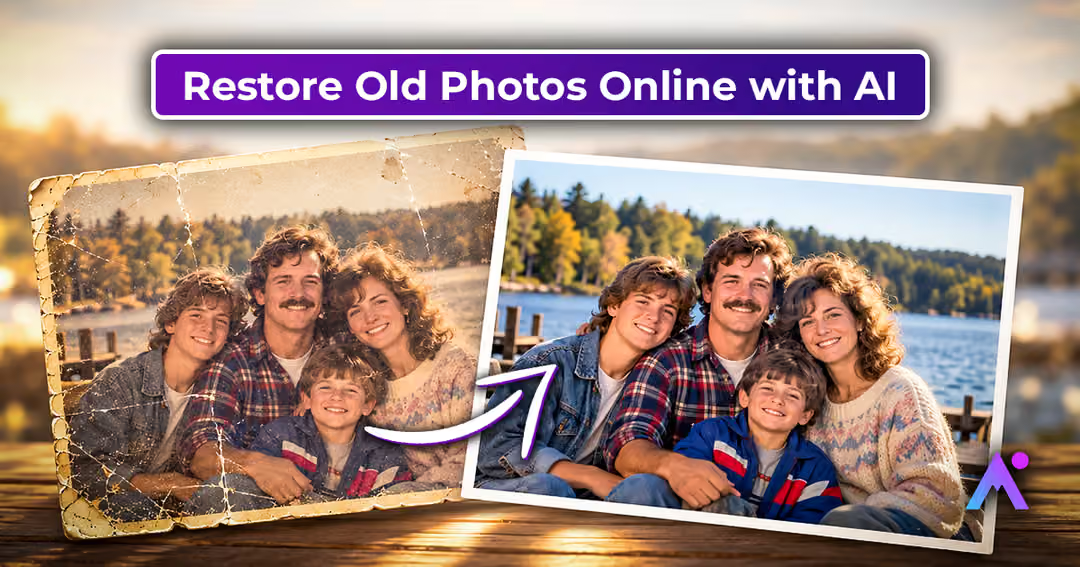
Every old photograph tells a story. It might capture a childhood birthday, a family wedding, a holiday with grandparents, or a moment that nobody wants to forget. Today, AI photo restoration and AI photo animation offer new ways to preserve these memories by improving damaged pictures and transforming still images into short animated videos. With the right tools, photographs hidden in old albums can become easier to view, share, and enjoy with future generations.
Whether you have a faded family portrait or a collection of vintage photographs, understanding how AI works can help you preserve your memories more thoughtfully.
Why Are Old Photographs Worth Preserving?
Old photographs are more than printed images. They often contain family stories, cultural traditions, personal milestones, and details about earlier generations.
Unfortunately, photographs can deteriorate because of sunlight, humidity, improper storage, and everyday handling. Colours may fade, paper can become brittle, and scratches or creases can affect the image.
Digitising old photographs is a useful first step towards protecting these memories. Once you have a digital copy, you can create backups, organise your collection, improve image quality, and explore creative ways to revisit the past.
What Is AI Photo Restoration?
AI photo restoration is a technology that uses machine learning to improve the appearance of photographs. It can analyse visual patterns and apply different enhancements depending on the image and the capabilities of the tool.
Some AI photo restoration tools offer features such as:
- Scratch reduction: Minimising the appearance of marks and small surface imperfections.
- Image sharpening: Improving the perceived clarity of faces and objects.
- Noise reduction: Reducing unwanted grain or digital noise.
- Colour enhancement: Improving faded tones and contrast.
- Damage reconstruction: Estimating missing details in selected damaged areas.
- Colourisation: Adding estimated colours to black-and-white photographs.
Not every tool includes all these features. Restoration results also depend on the original photograph’s condition.
AI can improve an image, but it cannot always recover the exact details of a person’s face or the original colours of a scene.
How AI Restores Old Photos Step by Step
Understanding the restoration process helps you set realistic expectations.
1. Scanning or Digitising the Photograph
The process begins with a digital copy of the original print.
You can use a photo scanner or a camera to digitise your photograph. Keep the picture flat, avoid harsh lighting, and check that the entire image is visible.
For photographs you plan to preserve, save a high-quality master scan before applying edits.
2. Identifying Image Problems
The AI model analyses the image to identify patterns associated with blur, scratches, noise, fading, and other imperfections.
The system uses what it learned during training to determine how the image might be improved.
3. Enhancing and Reconstructing Details
Depending on the software, AI may adjust sharpness, improve contrast, reduce noise, or reconstruct damaged sections.
For example, a portrait with light scratches may look cleaner after processing. A blurry image may appear sharper, although some generated details might not match the original subject perfectly.
4. Reviewing the Restored Photograph
Once the restoration is complete, compare the result with the original.
Check facial features, clothing details, backgrounds, and colours. If the restored image looks unnatural, try gentler enhancement settings or another approach.
Always retain the original scan.
How AI Animation Turns Old Photographs into Moving Memories
Photo restoration improves the image, while AI animation adds movement.
AI photo animation tools generate video frames that simulate motion in a still photograph. These animations may include blinking, smiling, subtle head movements, or gentle expressions.
For families, this creates an interesting way to revisit photographs from important moments.
Imagine discovering an old photograph of your grandparents from their early years. An animation tool might create a short clip in which they appear to move or smile.
Although the result can feel emotional, it is important to remember that the movement is generated by AI. It is not evidence of how the person actually moved or behaved.
How Does AI Photo Animation Work?
Step 1: Analysing the Subject
Many animation systems detect facial landmarks, facial proportions, and other visual characteristics.
Clear portraits with visible facial features may produce more consistent results than images with heavy damage or unusual angles.
Step 2: Applying Motion Patterns
The AI model uses learned motion patterns to generate movements that fit the photograph.
Depending on the platform, these effects may include eye movements, blinking, smiling, or head turns.
Step 3: Generating Video Frames
The system produces a sequence of frames that creates the illusion of movement.
Some platforms generate short clips, while others offer additional motion controls or creative effects.
Step 4: Checking the Final Animation
Preview the generated video and check whether the movements look natural and respectful.
Pay attention to facial consistency, unusual distortions, and changes in the background before saving or sharing the clip.
Should You Restore a Photograph Before Animating It?
Restoring an old photograph before animation can be helpful, particularly when the image contains visible scratches, fading, or low contrast.
However, restoration is not always necessary.
Consider restoring first when:
- The photograph has noticeable scratches or stains.
- Facial features are difficult to see.
- The image has faded significantly.
- The animation tool struggles with image quality.
Consider animating directly when:
- The photograph is already clear.
- The image has good lighting and visible facial features.
- You prefer to preserve its original appearance.
Excessive restoration may change facial details, so compare both approaches if the photograph is especially meaningful.
How to Animate Old Photos Online
You can create an animated memory through a simple online workflow.
- Choose a photograph: Select a family portrait, childhood memory, wedding picture, or vintage photograph.
- Create a digital copy: Scan the print or capture a clear image.
- Save the original: Keep an untouched backup.
- Enhance if necessary: Use an AI photo restoration tool to improve the image.
- Choose an animation platform: Explore a tool such as Animate Memories.
- Upload your image: Follow the platform’s instructions.
- Generate the animation: Select the available animation options and create your clip.
- Review the result: Check the image quality and movement.
- Save your memory: Download the output if available and organise it with your other family photographs.
Before uploading private photographs, review the service’s privacy policies, storage practices, and sharing options.
Meaningful Ways to Use AI-Restored and Animated Photos
AI-restored and animated photographs can become part of several creative projects.
Create a Family Anniversary Surprise
An old wedding portrait can become a thoughtful anniversary gift. Pair the restored photograph with a written message or a collection of memories from the couple’s journey.
Build a Digital Family Album
Organise photographs by year, event, or generation. Include names, locations, and short stories to make the album more useful for relatives.
Revisit Childhood Memories
Restore childhood photographs and combine them with captions explaining where the picture was taken and who was present.
Celebrate Family History
Use restored portraits in family history presentations, genealogy projects, or personal heritage collections.
Create a Memorial Tribute
A photograph can serve as a meaningful tribute to a loved one. Choose gentle effects and consider the wishes and feelings of family members before creating or sharing an animation.
Common Challenges of AI Photo Restoration and Animation
AI tools are useful, but they have limitations.
Unrealistic facial details: Restoration may generate features that were not present in the original photograph.
Unexpected movement: Animation can sometimes produce unusual expressions, distorted faces, or unnatural motion.
Incorrect colours: Colourisation estimates may not reflect the photograph’s original appearance.
Poor source quality: Severely blurred, incomplete, or damaged photographs may be difficult to process.
Privacy concerns: Personal photographs may contain sensitive family information, so use trusted services and appropriate sharing settings.
For historically significant photographs, consider professional restoration if authenticity is especially important.
Tips to Protect Your Photo Collection
Preserving photographs involves more than enhancing them with AI.
- Store printed photographs in a cool, dry place.
- Protect them from direct sunlight and excessive humidity.
- Use suitable archival storage materials.
- Handle fragile photographs carefully.
- Keep original digital scans separate from edited versions.
- Maintain more than one backup of important digital files.
- Record names, dates, and family stories while information is available.
These small habits can help protect family memories for years to come.
Conclusion
AI photo restoration and animation are changing how people reconnect with old photographs. Restoration can improve the appearance of faded and damaged images, while animation offers a creative way to experience still photographs through AI-generated movement.
From family albums and wedding memories to childhood portraits and heritage projects, these technologies can make preserving personal history more engaging.
The real value of an old photograph is not simply its appearance. It is the memory and story it carries.
With Animate Memories, you can explore AI photo animation and create moving versions of meaningful photographs. Choose a favourite memory, review your results, and find a new way to celebrate the moments that matter.
Keywords: AI photo restoration, AI photo animation, how AI restores old photos, how to animate old photos, restore old photos with AI, animate family photos, animate old pictures with AI, bring old photos to life, old photo restoration online, AI photo enhancer, restoring vintage photographs, family photo animation, restore and animate old photos











Leave feedback about this